Outdated Or Unpatched Software
Software developers are constantly coming out with new patches to fix bugs and errors to reduce vulnerabilities. Some applications are millions of lines of code long making vulnerabilities an inevitable part of software deployment. As a result, developers deploy patches to software to remediate these vulnerabilities, although patches may also be performance or feature upgrades.
Maintaining the security of software code is an on going battle, with major companies like Facebook, Apple, and Microsoft releasing patches daily to defend against new cyber threats. It’s not uncommon for software and hardware vendors to announce end of life dates (EOL). These legacy products are often no longer profitable and cost resources (software developers) to support.
As an example, Microsoft announced that the Windows 7 operating system will no longer be supported after January 14, 2020.
Systems running Windows 7 after January 14th will pose a serious security risk to a company’s network. It’s recommended that these systems be updated to a current operating system, like Windows 10. Performing routine network vulnerability scans and assessments are one way to identify and remediate known vulnerabilities on your network.
Misconfigured Firewalls / Operating Systems
One of the most significant threats to an organization is exposing your internal network or servers to the internet. When exposed, threat actors are easily able to spy on your traffic, steal data, or compromise your network.

What Does A Firewall Do?
Firewalls are often deployed in the DMZ (demilitarized zone) which serves as a buffer between the internet and your internal network. Firewalls are the front line of defense, monitoring inbound and outbound traffic and choosing whether to allow or block traffic based on a set of rules.
Network administrators create rules for incoming and outgoing network communication. For example, website traffic is sent through HTTP (hypter text transmission protocol) or HTTPS (hypter text transmission protocol secure).
A firewall is sometimes set up in front of a web server and configured to allow traffic from port 80 (HTTP) and port 443 (HTTPS) to the web server. Firewalls that are protecting internal networks may then be configured to block those ports from sending or receiving traffic.

However, not all traffic should be allowed into a network. For example, Internet Control Message Protocol (ICMP) is used to test basic connectivity of devices in a network. This traffic is often blocked on a firewall and router as threat actors can send a ping request, which can check the connectivity between two systems to discover devices on a network.
If the firewall isn’t configured correctly to block this traffic then threat actors can monitor traffic or deploy an attack on your network. Finally, firewall penetration tests are performed to test the effectiveness of your security controls.
Changing Default Operating System Policies
Many systems today run on the Microsoft operating system (OS), however, Linux and Apple make up the three main operating systems used. In the case of Microsoft, their system ships with the default security settings enabled.
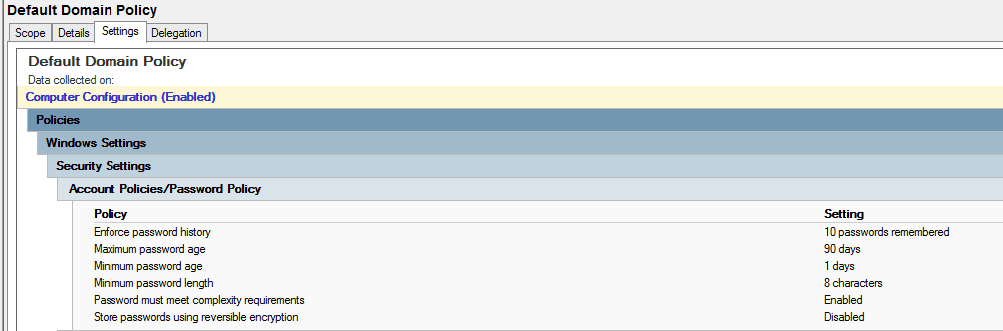
The example above is a business’s default domain password policy.
- Enforce password history stores the number of previous passwords used. The longer a password is used the more susceptible it is to being compromised.
- Maximum password age determines how long the password remains in use before it expires. Experience tells us that users will not change their password unless they are forced to do so.
- Minimum password age determines the period of time (in days) that a password can be used before the system requires the user to change it.
- Minimum password length is self explanatory. The longer the password the more difficult it is to crack.
- Password complexity requirements include use of special characters (!$&), numbers (123), and a mixture of upper case and lower case letters.
- Store passwords using reversible encryption means encrypting and storing passwords as well as being able to decrypt them.
While the default settings are good security precautions to take they can be greatly improved upon.
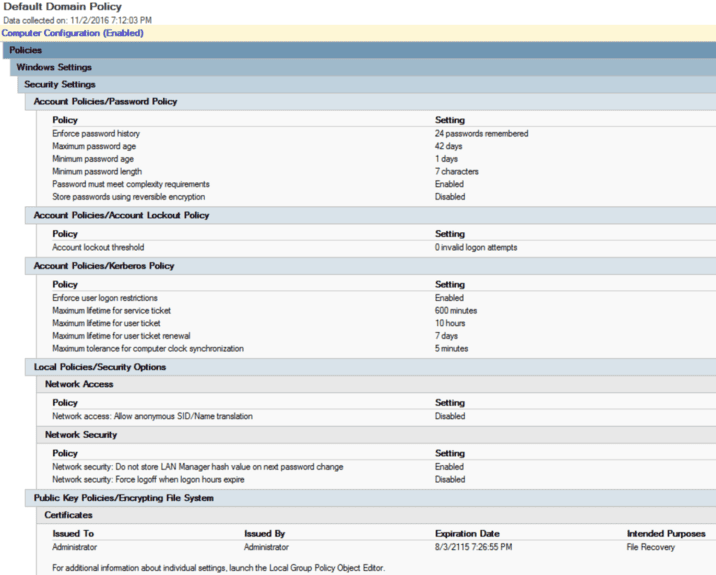
In this example, Microsoft recommends changing the password history from 10 to 24 passwords and reducing the maximum password age from 90 days to 42 days. It’s ultimately the responsibility of the network administrator to ensure that the domain, workstations, and devices are set up to adhere to cyber security policies within the organization.
